Artificial Intelligence
What You Need to Build a 4x NVIDIA DGX Spark Cluster: Switch, Cabling, & Power
August 7, 2026
9 min read

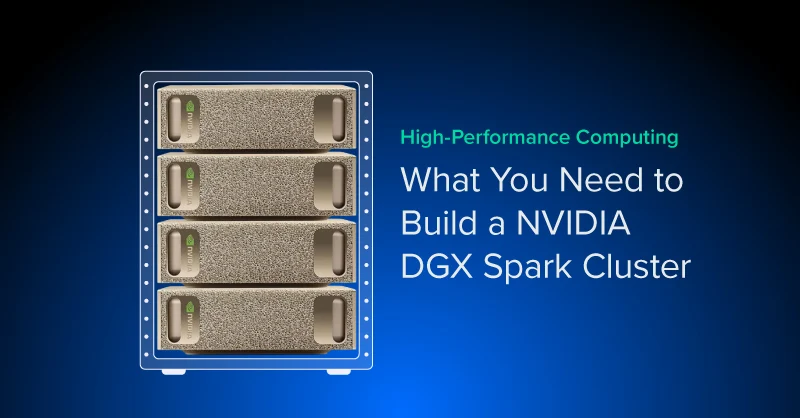
A single NVIDIA DGX® Spark tops out around a 200 billion parameter model on its own (with heavy quantization), like what we did with DeepSeek V4 Flash (284B). Link two units directly, and that ceiling jumps to models as large as 405 billion parameters. Four units is where the setup changes character: NVIDIA's own clustering guidance supports up to three DGX Spark systems connected with direct cables.
But four or more requires a managed network switch. We wanted to cover the build sheet actually looks like, with considerations when scaling your NVIDIA DGX Spark systems.
For most NVIDIA DGX Spark deployments, their workload can be accomplished with one or two. So who is a 4x NVIDIA DGX Spark for? A 4-node NVIDIA DGX Spark cluster is for teams that want to push beyond a single desk-side AI system without jumping straight into a full data center deployment.
It's also a real hardware investment. Four unit DGX Spark becomes a compact multi-node AI cluster: still small enough to fit into an office or lab, but powerful enough to explore workloads that a single unit simply cannot handle.
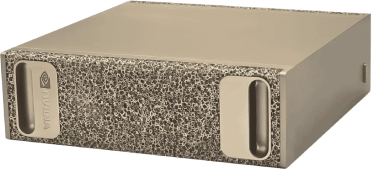
Take enterprise AI anywhere. NVIDIA DGX Spark can power your LLM, Agentic AI, and model prototyping on the go! Harness datacenter power today, available now through Exxact Corporation.
Get a Quote TodayEach DGX Spark unit is built around NVIDIA's GB10 Grace Blackwell superchip, with 128GB of unified LPDDR5x memory shared between CPU and GPU, 4TB of NVMe storage, and two ConnectX-7 network ports for interconnect alongside a 10GbE RJ-45 port.
Here's how that scales from one unit to four:
| NVIDIA DGX Spark | Combined Unified Memory | NVMe storage | Combined FP4 Tensor Throughput | Connection Method | Approx. Model Size Support (NVFP4) | Networking Switch Required? |
|---|---|---|---|---|---|---|
| 1x | 128GB | 4TB | 1 petaflop | N/A | Up to 200B | No |
| 2x | 256GB | 8TB | 2 petaflops | Direct QSFP Connection | Up to 400B | No |
| 3x | 384GB | 12TB | 3 petaflops | Direct QSFP Connection via Mesh | Up to 600B | No |
| 4x | 512GB | 16TB | 4 petaflops | Managed Switch with 4x QSFP Ports | Up to 700B to 800B | Yes |
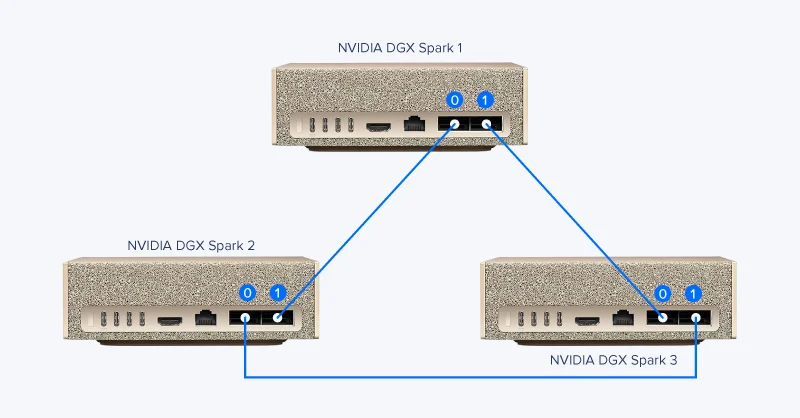
NVIDIA's own clustering guidance supports up to three DGX Spark systems connected with direct cable while four (or more) require a managed network switch.
Before four units make a switch necessary, it's worth seeing how NVIDIA gets two and three units talking to each other with nothing but cable.
Here’s the list of things we will need to network our 4x NVIDIA DGX Spark systems together:
After cabling is in place, log into the CRS804's admin console and manually set each connected port speed to 200Gbps rather than leaving it on auto-negotiate. NVIDIA's own Cluster Assistant documentation calls this out directly, instructing switch users to verify the switch is negotiating the correct port speed and adjust it manually if it isn't.
Don't be surprised when measured throughput lands closer to 100Gbps per link once the cluster is running. That's expected, not a misconfiguration. It's the PCIe Gen5 x4 ceiling inside each ConnectX-7 port showing up in practice, not a sign the switch is set wrong.
NVIDIA Sync's Cluster Assistant handles most of the networking configuration automatically: node discovery, ConnectX-7 setup, IP planning, link validation, and password-less SSH between nodes. Distributed workloads also need MPI for inter-process communication and NCCL for GPU-accelerated collective operations across nodes.
Rather than repeat NVIDIA's own setup steps here, these are the official references worth working from directly:
Yes, firmware and software side. NVIDIA's clustering tools assume matched hardware and firmware across nodes. An easy way to do this is to clone the SSDs, OS and everything, but make sure to change the device name. Hardware side, you can use any NVIDIA DGX Spark alternative: Asus Ascent GX10, MSI EdgeXpert, Founders Edition, etc.
Yes, though 2 or 3 units are simpler and cheaper to connect with direct cables instead. You can also expand your cluster up to 8 DGX Sparks with breakout cables.
No. It's a desk-scale or homelab way to prototype multi-node workflows and run larger models and multiple concurrent AI locally, not an enterprise cluster replacement. Think of it as a NVIDIA DGX prototype.
The auto-negotiation often sets the switch port speeds to 50Gbps, which is not the maximum or ideal networking speed the DGX Spark can push. NVIDIA's own Cluster Assistant guidance flags this as a common point of misconfiguration and instructs users to check and correct it directly in the switch's admin console.
On a 4× DGX Spark cluster (~512GB unified memory total), you can realistically target:
Rule of thumb: 4 nodes is mainly about either (a) pushing into ~hundreds-of-billions parameter inference with quantization, or (b) running multiple 30B–70B-class models at the same time with good latency.
A 4-node DGX Spark cluster sits in a specific niche: bigger than what a single desk-side unit can handle, smaller and cheaper than a dedicated DGX server deployment. It's a reasonable way to test multi-node inference and agent workflows against genuinely large models before deciding whether a full server or cluster purchase is justified.
Exxact carries the DGX Spark units and the MikroTik CRS804-4DDQ-HRM switch, and all the cables you may need. We also supply the broader lineup of HPC and AI hardware for teams scaling past a single workstation. If a 4-node cluster is the right fit for your workload, configuring the switch and matching compute together is the natural next step.
Take enterprise AI anywhere. NVIDIA DGX Spark can power your LLM, Agentic AI, and model prototyping on the go! Harness datacenter power today, available now through Exxact Corporation.
Get a Quote TodayA single NVIDIA DGX® Spark tops out around a 200 billion parameter model on its own (with heavy quantization), like what we did with DeepSeek V4 Flash (284B). Link two units directly, and that ceiling jumps to models as large as 405 billion parameters. Four units is where the setup changes character: NVIDIA's own clustering guidance supports up to three DGX Spark systems connected with direct cables.
But four or more requires a managed network switch. We wanted to cover the build sheet actually looks like, with considerations when scaling your NVIDIA DGX Spark systems.
For most NVIDIA DGX Spark deployments, their workload can be accomplished with one or two. So who is a 4x NVIDIA DGX Spark for? A 4-node NVIDIA DGX Spark cluster is for teams that want to push beyond a single desk-side AI system without jumping straight into a full data center deployment.
It's also a real hardware investment. Four unit DGX Spark becomes a compact multi-node AI cluster: still small enough to fit into an office or lab, but powerful enough to explore workloads that a single unit simply cannot handle.
Take enterprise AI anywhere. NVIDIA DGX Spark can power your LLM, Agentic AI, and model prototyping on the go! Harness datacenter power today, available now through Exxact Corporation.
Get a Quote TodayEach DGX Spark unit is built around NVIDIA's GB10 Grace Blackwell superchip, with 128GB of unified LPDDR5x memory shared between CPU and GPU, 4TB of NVMe storage, and two ConnectX-7 network ports for interconnect alongside a 10GbE RJ-45 port.
Here's how that scales from one unit to four:
| NVIDIA DGX Spark | Combined Unified Memory | NVMe storage | Combined FP4 Tensor Throughput | Connection Method | Approx. Model Size Support (NVFP4) | Networking Switch Required? |
|---|---|---|---|---|---|---|
| 1x | 128GB | 4TB | 1 petaflop | N/A | Up to 200B | No |
| 2x | 256GB | 8TB | 2 petaflops | Direct QSFP Connection | Up to 400B | No |
| 3x | 384GB | 12TB | 3 petaflops | Direct QSFP Connection via Mesh | Up to 600B | No |
| 4x | 512GB | 16TB | 4 petaflops | Managed Switch with 4x QSFP Ports | Up to 700B to 800B | Yes |
NVIDIA's own clustering guidance supports up to three DGX Spark systems connected with direct cable while four (or more) require a managed network switch.
Before four units make a switch necessary, it's worth seeing how NVIDIA gets two and three units talking to each other with nothing but cable.
Here’s the list of things we will need to network our 4x NVIDIA DGX Spark systems together:
After cabling is in place, log into the CRS804's admin console and manually set each connected port speed to 200Gbps rather than leaving it on auto-negotiate. NVIDIA's own Cluster Assistant documentation calls this out directly, instructing switch users to verify the switch is negotiating the correct port speed and adjust it manually if it isn't.
Don't be surprised when measured throughput lands closer to 100Gbps per link once the cluster is running. That's expected, not a misconfiguration. It's the PCIe Gen5 x4 ceiling inside each ConnectX-7 port showing up in practice, not a sign the switch is set wrong.
NVIDIA Sync's Cluster Assistant handles most of the networking configuration automatically: node discovery, ConnectX-7 setup, IP planning, link validation, and password-less SSH between nodes. Distributed workloads also need MPI for inter-process communication and NCCL for GPU-accelerated collective operations across nodes.
Rather than repeat NVIDIA's own setup steps here, these are the official references worth working from directly:
Yes, firmware and software side. NVIDIA's clustering tools assume matched hardware and firmware across nodes. An easy way to do this is to clone the SSDs, OS and everything, but make sure to change the device name. Hardware side, you can use any NVIDIA DGX Spark alternative: Asus Ascent GX10, MSI EdgeXpert, Founders Edition, etc.
Yes, though 2 or 3 units are simpler and cheaper to connect with direct cables instead. You can also expand your cluster up to 8 DGX Sparks with breakout cables.
No. It's a desk-scale or homelab way to prototype multi-node workflows and run larger models and multiple concurrent AI locally, not an enterprise cluster replacement. Think of it as a NVIDIA DGX prototype.
The auto-negotiation often sets the switch port speeds to 50Gbps, which is not the maximum or ideal networking speed the DGX Spark can push. NVIDIA's own Cluster Assistant guidance flags this as a common point of misconfiguration and instructs users to check and correct it directly in the switch's admin console.
On a 4× DGX Spark cluster (~512GB unified memory total), you can realistically target:
Rule of thumb: 4 nodes is mainly about either (a) pushing into ~hundreds-of-billions parameter inference with quantization, or (b) running multiple 30B–70B-class models at the same time with good latency.
A 4-node DGX Spark cluster sits in a specific niche: bigger than what a single desk-side unit can handle, smaller and cheaper than a dedicated DGX server deployment. It's a reasonable way to test multi-node inference and agent workflows against genuinely large models before deciding whether a full server or cluster purchase is justified.
Exxact carries the DGX Spark units and the MikroTik CRS804-4DDQ-HRM switch, and all the cables you may need. We also supply the broader lineup of HPC and AI hardware for teams scaling past a single workstation. If a 4-node cluster is the right fit for your workload, configuring the switch and matching compute together is the natural next step.
Take enterprise AI anywhere. NVIDIA DGX Spark can power your LLM, Agentic AI, and model prototyping on the go! Harness datacenter power today, available now through Exxact Corporation.
Get a Quote Today