Artificial Intelligence
7 Ways You Can Use Local Agentic AI
November 12, 2026
7 min read


AI agents can now plan multi-step tasks, pull data from internal systems, and act on the results with minimal supervision. For small and medium businesses, the question is where agents fit into daily work and whether they should run on cloud services or on hardware the business owns. This list covers seven departments where local agentic AI delivers practical value, followed by what it takes to run it.
An AI agent is a language model connected to tools such as databases, APIs, scripts, and file systems. Rather than simply answering a prompt, it can break a goal into steps, use tools, check results, and continue toward a task's completion.
Local agentic AI runs models on workstations or servers on-premises rather than through a cloud API. Agents can still connect to business systems, while local inference gives organizations more control over where models, prompts, and data are processed. Benefits include:
Research groups generate large volumes of data and paperwork, and much of it falls under institutional data policies that restrict cloud use.
Engineering teams work with years of drawings, test reports, and simulation results that rarely get reused because they are hard to search.
For export-controlled projects, local inference can provide greater control over sensitive data, subject to applicable security and access requirements.
Source code is a valuable asset, making local coding agents worth considering for teams that want to keep their repositories private.
Warehouse teams spend time resolving exceptions such as short shipments, mismatched purchase orders, and late deliveries.
Sales teams spend a large share of their week on research and data entry instead of conversations with customers.
Product managers collect input from many channels and need to turn it into clear priorities.
Back-office teams often handle repetitive, rules-based work that can be a good fit for agent-assisted workflows.
GPU memory is often a key consideration. Models need memory for their weights, while long conversations and tool outputs add to the memory required for context. Concurrent users increase that demand.
| Deployment | Typical users | Suggested hardware |
|---|---|---|
| Single team pilot | A handful of users, one or two agents | Multi-GPU workstation |
| Department-wide | Dozens of users, several concurrent agents | Multi-GPU server |
| Multiple departments or fine-tuning | Organization-wide use, model customization | Multi-node GPU cluster |
A workstation pilot can help validate a use case before investing in a larger deployment.
Open-weight models can perform well on focused, repeatable tasks, especially when prompted or tuned for a specific workflow. Performance varies by model and task, so test candidates against your requirements.
Yes. The model can run locally while the agent connects to external systems through their APIs. Review those integrations and their data flows to control what leaves your network.
A workstation can be enough for a pilot with a few users, depending on the model, context length, and workload. Start with one workflow and assess whether you need a server as usage grows.
Start with agents that draft and recommend. Keep people in the approval loop for consequential actions, and expand automation only after testing and establishing appropriate safeguards.
The best first agent addresses a repetitive, well-defined task for a team that feels its impact—for example, reconciling invoices or triaging failed builds. Choose one workflow, measure the time it saves, and use the results to guide your scaling and hardware plans.
Powering your Local AI Agents with Exxact! Exxact builds multi-GPU workstations, servers, and clusters for running agentic AI on-premises. Systems can be configured for your model sizes and user counts, whether you're starting with a single-team pilot or planning a department-wide deployment.
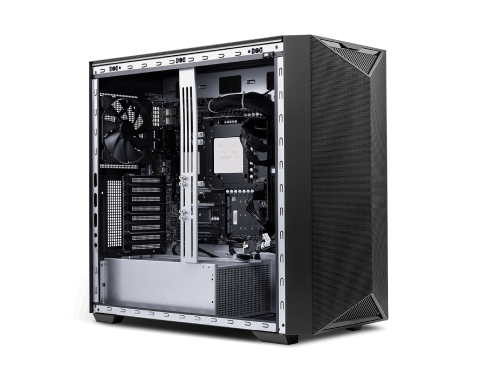
Exxact Valence 4x Max-Q Workstation, NVIDIA DGX Spark, and Exxact Valence built on NVIDIA DGX Station GB300 deliver data‑center‑class AI performance to run bleeding-edge models and agentic AI locally. Your entire AI usage and data in your control.
Get a Quote TodayAI agents can now plan multi-step tasks, pull data from internal systems, and act on the results with minimal supervision. For small and medium businesses, the question is where agents fit into daily work and whether they should run on cloud services or on hardware the business owns. This list covers seven departments where local agentic AI delivers practical value, followed by what it takes to run it.
An AI agent is a language model connected to tools such as databases, APIs, scripts, and file systems. Rather than simply answering a prompt, it can break a goal into steps, use tools, check results, and continue toward a task's completion.
Local agentic AI runs models on workstations or servers on-premises rather than through a cloud API. Agents can still connect to business systems, while local inference gives organizations more control over where models, prompts, and data are processed. Benefits include:
Research groups generate large volumes of data and paperwork, and much of it falls under institutional data policies that restrict cloud use.
Engineering teams work with years of drawings, test reports, and simulation results that rarely get reused because they are hard to search.
For export-controlled projects, local inference can provide greater control over sensitive data, subject to applicable security and access requirements.
Source code is a valuable asset, making local coding agents worth considering for teams that want to keep their repositories private.
Warehouse teams spend time resolving exceptions such as short shipments, mismatched purchase orders, and late deliveries.
Sales teams spend a large share of their week on research and data entry instead of conversations with customers.
Product managers collect input from many channels and need to turn it into clear priorities.
Back-office teams often handle repetitive, rules-based work that can be a good fit for agent-assisted workflows.
GPU memory is often a key consideration. Models need memory for their weights, while long conversations and tool outputs add to the memory required for context. Concurrent users increase that demand.
| Deployment | Typical users | Suggested hardware |
|---|---|---|
| Single team pilot | A handful of users, one or two agents | Multi-GPU workstation |
| Department-wide | Dozens of users, several concurrent agents | Multi-GPU server |
| Multiple departments or fine-tuning | Organization-wide use, model customization | Multi-node GPU cluster |
A workstation pilot can help validate a use case before investing in a larger deployment.
Open-weight models can perform well on focused, repeatable tasks, especially when prompted or tuned for a specific workflow. Performance varies by model and task, so test candidates against your requirements.
Yes. The model can run locally while the agent connects to external systems through their APIs. Review those integrations and their data flows to control what leaves your network.
A workstation can be enough for a pilot with a few users, depending on the model, context length, and workload. Start with one workflow and assess whether you need a server as usage grows.
Start with agents that draft and recommend. Keep people in the approval loop for consequential actions, and expand automation only after testing and establishing appropriate safeguards.
The best first agent addresses a repetitive, well-defined task for a team that feels its impact—for example, reconciling invoices or triaging failed builds. Choose one workflow, measure the time it saves, and use the results to guide your scaling and hardware plans.
Powering your Local AI Agents with Exxact! Exxact builds multi-GPU workstations, servers, and clusters for running agentic AI on-premises. Systems can be configured for your model sizes and user counts, whether you're starting with a single-team pilot or planning a department-wide deployment.
Exxact Valence 4x Max-Q Workstation, NVIDIA DGX Spark, and Exxact Valence built on NVIDIA DGX Station GB300 deliver data‑center‑class AI performance to run bleeding-edge models and agentic AI locally. Your entire AI usage and data in your control.
Get a Quote Today