Benchmarks
NVIDIA RTX PRO 4500 Blackwell Server Edition — LLM Inference Benchmark
May 20, 2026
10 min read

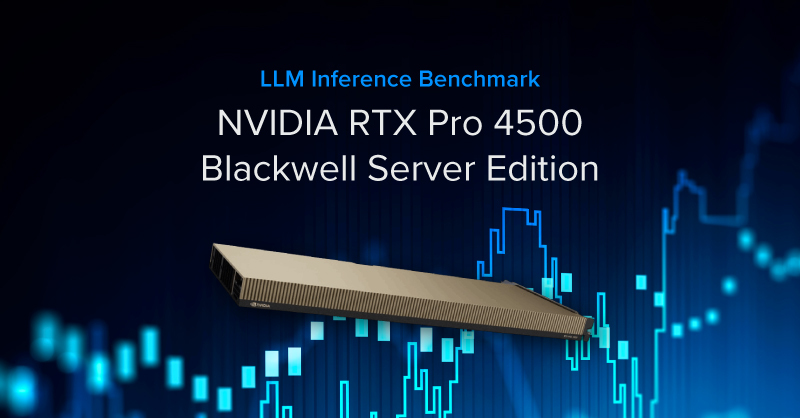
AI inference is no longer confined to the cloud. As stricter data-privacy requirements and tighter latency targets become the norm, the growing availability of capable open‑weight models is enabling more organizations to run LLMs on hardware they own and control. This increased flexibility, need for privacy, performance, and operational control, is accelerating the shift toward on‑premise and edge inference deployments.
We are testing NVIDIA’s newest GPU, the NVIDIA RTX PRO™ 4500 Blackwell Server Edition, to determine which model sizes it supports, how fast it can run, how it scales, and where this card fits in an LLM AI deployment.
The RTX PRO 4500 Blackwell Server Edition is a single-slot, passively cooled GPU featuring:
It is designed for dense server and rack deployments where slot count, airflow, and power per GPU are constraints, especially on edge deployments.
For more information about the NVIDIA RTX PRO 4500 Server Edition, read our release blog here.
To understand why the RTX NVIDIA PRO 4500 Server Edition's 32GB matters, it helps to understand what actually limits LLM inference performance. The answer is rarely compute; it is memory. If the model does not fit in VRAM at all, it falls back to system RAM or storage, which is 10 to 50 times slower.
However, model size determines what fits, but quantization determines what's possible. Full-precision (FP16) stores each model weight at 16 bits. Quantization compresses those weights to fewer bits, trading a small amount of accuracy for a much smaller memory footprint. The practical effect:
| Model | Parameters | Quantization | Est. VRAM | Architecture |
|---|---|---|---|---|
| Phi-4-14B | 14B | Q4_K_M (4-bit) | ~8 GB | Dense |
| Nemotron-Nano-30B | 30B active / 253B total | Q4_K_M (4-bit) | ~17 GB | MoE |
| Gemma4-31B | 31B | Q4_K_M (4-bit) | ~16 GB | Dense (FP4-native) |
| Llama 3.3 70B | 70B | Q3_K_M (3-bit) | ~28–30 GB | Dense |
Quality loss at Q4 is minimal for most tasks. At Q3, degradation is measurable but acceptable for research, coding assistance, and document workflows.
The two primary metrics are token generation speed (tg tok/s), which is how fast the model produces output, and prompt processing speed (pp tok/s), which is how fast the model digests the input. Token generation is the primary user-experience metric. At 10 tok/s, the output is very slow but readable; 30 tok/s is the baseline for usable; above 50 tok/s is the gold standard; and 100+ tok/s is near instant.
The benchmark covers three models tested on 1, 2, and 4 GPU configurations:
GPU Count | Model | Ollama tg (tok/s) | llamabench pp (tok/s) | Avg Power (W) | Efficiency (tok/W) | ||||||||||||||||||||||||
|---|---|---|---|---|---|---|---|---|---|---|---|---|---|---|---|---|---|---|---|---|---|---|---|---|---|---|---|---|---|
| NVIDIA RTX PRO 4500 on Phi-4 14B | |||||||||||||||||||||||||||||
| 1x RTX PRO 4500 Blackwell SE | Phi-4 14B Q4_K_M | 75.7 | 1,856 | 106.9 W | 0.71 | ||||||||||||||||||||||||
| 2x RTX PRO 4500 Blackwell SE | Phi-4 14B Q4_K_M | 75.6 | 1,939 | 143.8 W | 0.53 | ||||||||||||||||||||||||
| 3x RTX PRO 4500 Blackwell SE | Phi-4 14B Q4_K_M | 75.5 | 1,957 | 169.3 W | 0.45 | ||||||||||||||||||||||||
| 4x RTX PRO 4500 Blackwell SE | Phi-4 14B Q4_K_M | 75.5 | 1,961 | 197.1 W | 0.38 | ||||||||||||||||||||||||
| NVIDIA RTX PRO 4500 SE on Gemma4-31B | |||||||||||||||||||||||||||||
| 1x RTX PRO 4500 Blackwell SE | Gemma4-31B Q4_K_M | 33.8 | – | 110.8 W | 0.31 | ||||||||||||||||||||||||
| 2x RTX PRO 4500 Blackwel lSE | Gemma4-31B Q4_K_M | 33.4 | – | 144.8 W | 0.23 | ||||||||||||||||||||||||
| 3x RTX PRO 4500 Blackwell SE | Gemma4-31B Q4_K_M | 33.5 | – | 156.7 W | 0.21 | ||||||||||||||||||||||||
| 4x RTX PRO 4500 Blackwell SE | Gemma4-31B Q4_K_M | 33.7 | – | 180.6 W | 0.19 | ||||||||||||||||||||||||
| NVIDIA RTX PRO 4500 SE on Nemotron-Nano-30B | |||||||||||||||||||||||||||||
| 1x RTX PRO 4500 Blackwell SE | Nemotron-Nano-30B Q4_K_M | 156.1 | 1,151 | 69.0 W | 2.26 | ||||||||||||||||||||||||
| 2x RTX PRO 4500 Blackwel lSE | Nemotron-Nano-30B Q4_K_M | 155.9 | 1,156 | 96.2 W | 1.62 | ||||||||||||||||||||||||
| 3x RTX PRO 4500 Blackwell SE | Nemotron-Nano-30B Q4_K_M | 155.7 | 1,153 | 126.7 W | 0.21 | ||||||||||||||||||||||||
| 4x RTX PRO 4500 Blackwell SE | Nemotron-Nano-30B Q4_K_M | 155.5 | 1,149 | 153.8 W | 0.19 | ||||||||||||||||||||||||
| NVIDIA RTX PRO 4500 on Llama 3.3 70B | |||||||||||||||||||||||||||||
| 1x RTX PRO 4500 Blackwell | Llama 3.3 70B Q3_K_M | 8.6 | DNR | DNR | DNR | ||||||||||||||||||||||||
| 2x RTX PRO 4500 Blackwell | Llama 3.3 70B Q3_K_M | 6.0 | 709 | 167.5 | 0.122 | ||||||||||||||||||||||||
| 3x RTX PRO 4500 Blackwell | Llama 3.3 70B Q3_K_M | 7.3 | 714 | 206.0 | 0.099 | ||||||||||||||||||||||||
| 4x RTX PRO 4500 Blackwell | Llama 3.3 70B Q3_K_M | 9.6 | 726 | 245.0 | 0.083 | ||||||||||||||||||||||||
The NVIDIA RTX PRO Blackwell lineup of GPUs, including the RTX PRO 4500 Server Edition, supports NVFP4 natively, an accelerated floating point format, executing 4-bit precision without a dequantization step. We ran llama 3.1 8B on vLLM since it supports NVFP4, and Ollama doesn’t.
Configuration | Model | Deployment Stack | tok/s | TTFT (time to first tok) | Notes | ||||||||||||||||||||||||
|---|---|---|---|---|---|---|---|---|---|---|---|---|---|---|---|---|---|---|---|---|---|---|---|---|---|---|---|---|---|
| 1x NVIDIA RTX PRO 4500 Llama 3.1 8B BF16 vs NVFP4 | |||||||||||||||||||||||||||||
| 1x RTX PRO 4500 Blackwell | Llama 3.1 8B | Ollama GGUF | 134 | 185 | Sequential reference | ||||||||||||||||||||||||
| 1x RTX PRO 4500 Blackwell | Llama 3.1 8B | vLLM BF16 | 2,031 | 25 | Batch reference | ||||||||||||||||||||||||
| 1x RTX PRO 4500 Blackwell | Llama 3.1 8B | vLLM NVFP4 | 4,870 | 13 | 2.40x BF16, same power | ||||||||||||||||||||||||
| 2x NVIDIA RTX PRO 4500 Llama 3.1 8B BF16 vs NVFP4 | |||||||||||||||||||||||||||||
| 2x RTX PRO 4500 Blackwell | Llama 3.1 8B | vLLM BF16 | 2,031 | 17 | Batch reference | ||||||||||||||||||||||||
| 2x RTX PRO 4500 Blackwell | Llama 3.1 8B | vLLM NVFP4 | 4,870 | 12 | 1.94x BF16 | ||||||||||||||||||||||||
| 4x NVIDIA RTX PRO 4500 Llama 3.1 8B BF16 vs NVFP4 | |||||||||||||||||||||||||||||
| 2x RTX PRO 4500 Blackwell | Llama 3.1 8B | vLLM BF16 | 3,892 | 14 | Batch reference, PCIe ceiling vs 2x GPU | ||||||||||||||||||||||||
| 2x RTX PRO 4500 Blackwell | Llama 3.1 8B | vLLM NVFP4 | 5,446 | 15 | 1.40x BF16, PCIe ceiling vs 2x GPU | ||||||||||||||||||||||||
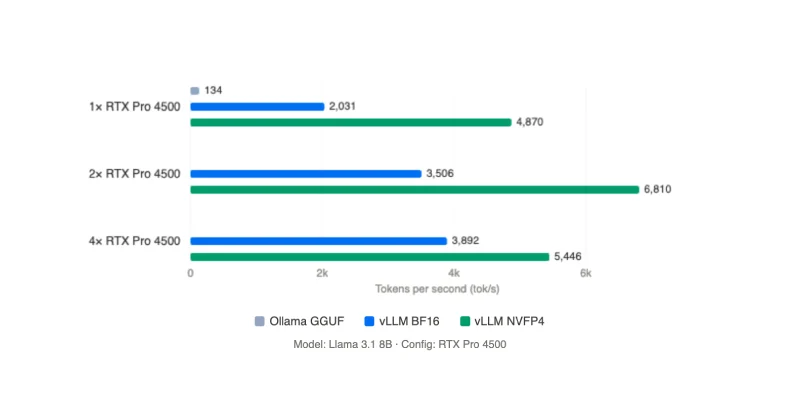
A single NVIDIA RTX PRO 4500 Blackwell Server Edition delivers 4,870 tok/s aggregate and a 13ms time-to-first-token, a 2.4x the throughput at the same power draw on BF16. Two cards under NVFP4 reach 6,810 tok/s in batch, but hit a wall when scaling to 4x GPUs due to PCIe bottleneck.
These numbers, however, are not directly comparable to the Ollama results above since Ollama measures single-user, single-request, whereas vLLM batches requests across many concurrent users. Here's how to interpret tok/s across stacks:
However, this batching is beneficial You can read more about Ollama vs vLLM on our previous post. The tok/s figure is aggregate output across all of them simultaneously. The right tool depends on the deployment pattern.
The benchmark data tells a clear story on multi-GPU scaling: for models that fit on a single card, adding GPUs does almost nothing for a single user's throughput.
| Does help | Doesn’t help | |
|---|---|---|
| Parameter Count | 70B on 2 GPUs (tensor-parallel)
Single GPU is limited (Ollama ~14.6 tok/s / llama-bench OOM). 2 GPUs gets ~20.4 tok/s (usable). |
8B / 31B (single user)
Extra GPUs don’t help: 8B is compute-bound, 32B is bandwidth-bound; PCIe can’t add per-request speed. |
| Throughput | Concurrent users (fleet mode)
Run 1 instance per GPU. Example: 4 GPUs = 4 users at full single-GPU speed (linear aggregate throughput). |
Single request on 3–4 GPUs
PCIe sync (~64 GB/s) bottlenecks; beyond 2 GPUs adds power, not speed (more idle time). |
The RTX Pro 4500 Server Edition is not a fit for every AI workload. It is purpose-built for a specific set of requirements, and understanding where it fits well is more useful than a broad recommendation.
It is a strong fit for:
It is not the right fit for:
The RTX Pro 4500 Blackwell Server Edition occupies a specific and practical position in the on-premises AI inference landscape. Its 32GB of GDDR7 memory on a single-slot passive 165W card is what makes it relevant: that combination of capacity and form factor is not common at this price and power tier.
| Use case | Recommendation | Deployment |
|---|---|---|
| Single user, 8B or 32B model | 1x RTX Pro 4500 Server Edition | Ollama |
| 70B at usable interactive speed (>15 tok/s) | 2x RTX Pro 4500 Server Edition | vLLM |
| Multiple concurrent users, independent sessions | 4x RTX Pro 4500 Server Edition, 1 GPU per user | Ollama or vLLM |
| Models larger than 32GB (70B Q4, 105B+) | 2 to 4x as needed for capacity but slow. Recommend upgrading or choosing a stronger GPU. | vLLM |
For AI teams that need capable on-premises inference within the constraints of standard rack infrastructure, regulated data environments, or limited power budgets, the RTX Pro 4500 Server Edition is a well-matched option. The hardware is available now. Configurations built around it are straightforward to deploy and operate within existing server infrastructure without specialized cooling or power provisioning.

Run your own open-weight LLM and skip the snowballing API costs. Built for individuals and teams alike. It's not just a piece of hardware, but the tool that propels, accelerates, and enables your research.
Configure NowAI inference is no longer confined to the cloud. As stricter data-privacy requirements and tighter latency targets become the norm, the growing availability of capable open‑weight models is enabling more organizations to run LLMs on hardware they own and control. This increased flexibility, need for privacy, performance, and operational control, is accelerating the shift toward on‑premise and edge inference deployments.
We are testing NVIDIA’s newest GPU, the NVIDIA RTX PRO™ 4500 Blackwell Server Edition, to determine which model sizes it supports, how fast it can run, how it scales, and where this card fits in an LLM AI deployment.
The RTX PRO 4500 Blackwell Server Edition is a single-slot, passively cooled GPU featuring:
It is designed for dense server and rack deployments where slot count, airflow, and power per GPU are constraints, especially on edge deployments.
For more information about the NVIDIA RTX PRO 4500 Server Edition, read our release blog here.
To understand why the RTX NVIDIA PRO 4500 Server Edition's 32GB matters, it helps to understand what actually limits LLM inference performance. The answer is rarely compute; it is memory. If the model does not fit in VRAM at all, it falls back to system RAM or storage, which is 10 to 50 times slower.
However, model size determines what fits, but quantization determines what's possible. Full-precision (FP16) stores each model weight at 16 bits. Quantization compresses those weights to fewer bits, trading a small amount of accuracy for a much smaller memory footprint. The practical effect:
| Model | Parameters | Quantization | Est. VRAM | Architecture |
|---|---|---|---|---|
| Phi-4-14B | 14B | Q4_K_M (4-bit) | ~8 GB | Dense |
| Nemotron-Nano-30B | 30B active / 253B total | Q4_K_M (4-bit) | ~17 GB | MoE |
| Gemma4-31B | 31B | Q4_K_M (4-bit) | ~16 GB | Dense (FP4-native) |
| Llama 3.3 70B | 70B | Q3_K_M (3-bit) | ~28–30 GB | Dense |
Quality loss at Q4 is minimal for most tasks. At Q3, degradation is measurable but acceptable for research, coding assistance, and document workflows.
The two primary metrics are token generation speed (tg tok/s), which is how fast the model produces output, and prompt processing speed (pp tok/s), which is how fast the model digests the input. Token generation is the primary user-experience metric. At 10 tok/s, the output is very slow but readable; 30 tok/s is the baseline for usable; above 50 tok/s is the gold standard; and 100+ tok/s is near instant.
The benchmark covers three models tested on 1, 2, and 4 GPU configurations:
GPU Count | Model | Ollama tg (tok/s) | llamabench pp (tok/s) | Avg Power (W) | Efficiency (tok/W) | ||||||||||||||||||||||||
|---|---|---|---|---|---|---|---|---|---|---|---|---|---|---|---|---|---|---|---|---|---|---|---|---|---|---|---|---|---|
| NVIDIA RTX PRO 4500 on Phi-4 14B | |||||||||||||||||||||||||||||
| 1x RTX PRO 4500 Blackwell SE | Phi-4 14B Q4_K_M | 75.7 | 1,856 | 106.9 W | 0.71 | ||||||||||||||||||||||||
| 2x RTX PRO 4500 Blackwell SE | Phi-4 14B Q4_K_M | 75.6 | 1,939 | 143.8 W | 0.53 | ||||||||||||||||||||||||
| 3x RTX PRO 4500 Blackwell SE | Phi-4 14B Q4_K_M | 75.5 | 1,957 | 169.3 W | 0.45 | ||||||||||||||||||||||||
| 4x RTX PRO 4500 Blackwell SE | Phi-4 14B Q4_K_M | 75.5 | 1,961 | 197.1 W | 0.38 | ||||||||||||||||||||||||
| NVIDIA RTX PRO 4500 SE on Gemma4-31B | |||||||||||||||||||||||||||||
| 1x RTX PRO 4500 Blackwell SE | Gemma4-31B Q4_K_M | 33.8 | – | 110.8 W | 0.31 | ||||||||||||||||||||||||
| 2x RTX PRO 4500 Blackwel lSE | Gemma4-31B Q4_K_M | 33.4 | – | 144.8 W | 0.23 | ||||||||||||||||||||||||
| 3x RTX PRO 4500 Blackwell SE | Gemma4-31B Q4_K_M | 33.5 | – | 156.7 W | 0.21 | ||||||||||||||||||||||||
| 4x RTX PRO 4500 Blackwell SE | Gemma4-31B Q4_K_M | 33.7 | – | 180.6 W | 0.19 | ||||||||||||||||||||||||
| NVIDIA RTX PRO 4500 SE on Nemotron-Nano-30B | |||||||||||||||||||||||||||||
| 1x RTX PRO 4500 Blackwell SE | Nemotron-Nano-30B Q4_K_M | 156.1 | 1,151 | 69.0 W | 2.26 | ||||||||||||||||||||||||
| 2x RTX PRO 4500 Blackwel lSE | Nemotron-Nano-30B Q4_K_M | 155.9 | 1,156 | 96.2 W | 1.62 | ||||||||||||||||||||||||
| 3x RTX PRO 4500 Blackwell SE | Nemotron-Nano-30B Q4_K_M | 155.7 | 1,153 | 126.7 W | 0.21 | ||||||||||||||||||||||||
| 4x RTX PRO 4500 Blackwell SE | Nemotron-Nano-30B Q4_K_M | 155.5 | 1,149 | 153.8 W | 0.19 | ||||||||||||||||||||||||
| NVIDIA RTX PRO 4500 on Llama 3.3 70B | |||||||||||||||||||||||||||||
| 1x RTX PRO 4500 Blackwell | Llama 3.3 70B Q3_K_M | 8.6 | DNR | DNR | DNR | ||||||||||||||||||||||||
| 2x RTX PRO 4500 Blackwell | Llama 3.3 70B Q3_K_M | 6.0 | 709 | 167.5 | 0.122 | ||||||||||||||||||||||||
| 3x RTX PRO 4500 Blackwell | Llama 3.3 70B Q3_K_M | 7.3 | 714 | 206.0 | 0.099 | ||||||||||||||||||||||||
| 4x RTX PRO 4500 Blackwell | Llama 3.3 70B Q3_K_M | 9.6 | 726 | 245.0 | 0.083 | ||||||||||||||||||||||||
.png?format=webp)
The NVIDIA RTX PRO Blackwell lineup of GPUs, including the RTX PRO 4500 Server Edition, supports NVFP4 natively, an accelerated floating point format, executing 4-bit precision without a dequantization step. We ran llama 3.1 8B on vLLM since it supports NVFP4, and Ollama doesn’t.
Configuration | Model | Deployment Stack | tok/s | TTFT (time to first tok) | Notes | ||||||||||||||||||||||||
|---|---|---|---|---|---|---|---|---|---|---|---|---|---|---|---|---|---|---|---|---|---|---|---|---|---|---|---|---|---|
| 1x NVIDIA RTX PRO 4500 Llama 3.1 8B BF16 vs NVFP4 | |||||||||||||||||||||||||||||
| 1x RTX PRO 4500 Blackwell | Llama 3.1 8B | Ollama GGUF | 134 | 185 | Sequential reference | ||||||||||||||||||||||||
| 1x RTX PRO 4500 Blackwell | Llama 3.1 8B | vLLM BF16 | 2,031 | 25 | Batch reference | ||||||||||||||||||||||||
| 1x RTX PRO 4500 Blackwell | Llama 3.1 8B | vLLM NVFP4 | 4,870 | 13 | 2.40x BF16, same power | ||||||||||||||||||||||||
| 2x NVIDIA RTX PRO 4500 Llama 3.1 8B BF16 vs NVFP4 | |||||||||||||||||||||||||||||
| 2x RTX PRO 4500 Blackwell | Llama 3.1 8B | vLLM BF16 | 2,031 | 17 | Batch reference | ||||||||||||||||||||||||
| 2x RTX PRO 4500 Blackwell | Llama 3.1 8B | vLLM NVFP4 | 4,870 | 12 | 1.94x BF16 | ||||||||||||||||||||||||
| 4x NVIDIA RTX PRO 4500 Llama 3.1 8B BF16 vs NVFP4 | |||||||||||||||||||||||||||||
| 2x RTX PRO 4500 Blackwell | Llama 3.1 8B | vLLM BF16 | 3,892 | 14 | Batch reference, PCIe ceiling vs 2x GPU | ||||||||||||||||||||||||
| 2x RTX PRO 4500 Blackwell | Llama 3.1 8B | vLLM NVFP4 | 5,446 | 15 | 1.40x BF16, PCIe ceiling vs 2x GPU | ||||||||||||||||||||||||
A single NVIDIA RTX PRO 4500 Blackwell Server Edition delivers 4,870 tok/s aggregate and a 13ms time-to-first-token, a 2.4x the throughput at the same power draw on BF16. Two cards under NVFP4 reach 6,810 tok/s in batch, but hit a wall when scaling to 4x GPUs due to PCIe bottleneck.
These numbers, however, are not directly comparable to the Ollama results above since Ollama measures single-user, single-request, whereas vLLM batches requests across many concurrent users. Here's how to interpret tok/s across stacks:
However, this batching is beneficial You can read more about Ollama vs vLLM on our previous post. The tok/s figure is aggregate output across all of them simultaneously. The right tool depends on the deployment pattern.
The benchmark data tells a clear story on multi-GPU scaling: for models that fit on a single card, adding GPUs does almost nothing for a single user's throughput.
| Does help | Doesn’t help | |
|---|---|---|
| Parameter Count | 70B on 2 GPUs (tensor-parallel)
Single GPU is limited (Ollama ~14.6 tok/s / llama-bench OOM). 2 GPUs gets ~20.4 tok/s (usable). |
8B / 31B (single user)
Extra GPUs don’t help: 8B is compute-bound, 32B is bandwidth-bound; PCIe can’t add per-request speed. |
| Throughput | Concurrent users (fleet mode)
Run 1 instance per GPU. Example: 4 GPUs = 4 users at full single-GPU speed (linear aggregate throughput). |
Single request on 3–4 GPUs
PCIe sync (~64 GB/s) bottlenecks; beyond 2 GPUs adds power, not speed (more idle time). |
The RTX Pro 4500 Server Edition is not a fit for every AI workload. It is purpose-built for a specific set of requirements, and understanding where it fits well is more useful than a broad recommendation.
It is a strong fit for:
It is not the right fit for:
The RTX Pro 4500 Blackwell Server Edition occupies a specific and practical position in the on-premises AI inference landscape. Its 32GB of GDDR7 memory on a single-slot passive 165W card is what makes it relevant: that combination of capacity and form factor is not common at this price and power tier.
| Use case | Recommendation | Deployment |
|---|---|---|
| Single user, 8B or 32B model | 1x RTX Pro 4500 Server Edition | Ollama |
| 70B at usable interactive speed (>15 tok/s) | 2x RTX Pro 4500 Server Edition | vLLM |
| Multiple concurrent users, independent sessions | 4x RTX Pro 4500 Server Edition, 1 GPU per user | Ollama or vLLM |
| Models larger than 32GB (70B Q4, 105B+) | 2 to 4x as needed for capacity but slow. Recommend upgrading or choosing a stronger GPU. | vLLM |
For AI teams that need capable on-premises inference within the constraints of standard rack infrastructure, regulated data environments, or limited power budgets, the RTX Pro 4500 Server Edition is a well-matched option. The hardware is available now. Configurations built around it are straightforward to deploy and operate within existing server infrastructure without specialized cooling or power provisioning.
Run your own open-weight LLM and skip the snowballing API costs. Built for individuals and teams alike. It's not just a piece of hardware, but the tool that propels, accelerates, and enables your research.
Configure Now