Benchmarks
LoRA Fine Tuning Benchmark on NVIDIA RTX PRO GPUs - RTX PRO 6000, 5000, 4500 Blackwell
June 4, 2026
7 min read

LoRA fine-tuning is one of the most practical ways to adapt large language models to a specialized domain. It delivers strong results without the memory footprint and hardware complexity of full fine-tuning, which makes it especially attractive for on-prem deployments in education, research, and enterprise environments.
To quantify how well NVIDIA RTX PRO Blackwell GPUs handle this workload, we ran a consistent LoRA fine-tuning benchmark across:
Below are the headline results, followed by the test setup and detailed scaling tables.
10,717 tok/s with 4x RTX PRO 4500 |
96.5% DDP Efficiency with 4x GPU coupled vs separate |
13.9 t/s per watt peak efficiecy on 4x RTX PRO 4500 |
We ran LoRA fine-tuning with Llama 3.1 8B instruct using HuggingFace Transformers with DDP (torchrun). Throughput is reported as per-step tokens-per-second averaged across steps 1-60 (excluding the warm-up step). Power is reported as average GPU draw across the run. VRAM is peak usage during training.
In this setup, LoRA fine-tuning memory footprint is dominated by base model weights plus optimizer states and activations. As a result, all three GPUs land in a similar VRAM range for this 8B workload (about 24-25 GB). Larger models and longer sequence lengths will increase VRAM needs, which is where higher-memory GPUs become more important.
| Parameter | Value | Notes |
|---|---|---|
| Base model | NousResearch/Meta-Llama-3.1-8B-Instruct | Ungated HF mirror with Meta’s weights |
| Fine-tuning method | LoRA (Low-Rank Adaptation) | Adapter-only; base weights frozen |
| LoRA rank | 16 | Standard rank for instruction-tuning tasks |
| LoRA targets | q_proj, v_proj | Attention projection matrices only |
| Batch size | 2 per GPU | Effective batch = 2 × n_gpus with DDP |
| Sequence length | 512 tokens | Representative of instruction/QA datasets |
| Training steps | 60 | Sufficient for stable throughput measurement |
| Multi-GPU strategy | DDP (Distributed Data Parallel) | Each GPU holds a full model replica; gradients synchronized |
| Precision | BF16 (mixed precision) | Base model in BF16 LoRA adapters in FP32 |
| System | AMD EPYC 9124 16C/32T | 4× RTX Pro 4500 (32GB) 2× RTX Pro 5000 (48GB) 2× RTX Pro 6000 SE (96GB) |
GPU Quantity | Aggregate tok/s | Tok/s per GPU | Scaling vs 1 GPU | Efficiency | Average Power (W) | Tok/s per Watt | |||||||||||||||||||||||
|---|---|---|---|---|---|---|---|---|---|---|---|---|---|---|---|---|---|---|---|---|---|---|---|---|---|---|---|---|---|
| NVIDIA RTX PRO 4500 Workstation Edition | |||||||||||||||||||||||||||||
| 1x | 2,777 | 2,777 | 1.00× | — | 289.8 | 9.6 | |||||||||||||||||||||||
| 2x | 5,429 | 2,715 | 1.96× | 97.8% | 455.3 | 11.9 | |||||||||||||||||||||||
| 3x | 8,083 | 2,694 | 2.91× | 97.0% | 623.9 | 13.0 | |||||||||||||||||||||||
| 4x | 10,717 | 2,679 | 3.86× | 96.5% | 771.7 | 13.9 | |||||||||||||||||||||||
| NVIDIA RTX PRO 5000 | |||||||||||||||||||||||||||||
| 1x | 3,721 | 3,721 | 1.00× | — | 358.3 | 10.4 | |||||||||||||||||||||||
| 2x | 7,216 | 3,608 | 1.93× | 97.8% | 568.2 | 12.7 | |||||||||||||||||||||||
| NVIDIA RTX PRO 6000 Server Edition | |||||||||||||||||||||||||||||
| 1x | 4,962 | 4,962 | 1.00× | — | 404.6 | 12.3 | |||||||||||||||||||||||
| 2x | 9,541 | 4,771 | 1.92× | 96.1% | 662.6 | 14.4 | |||||||||||||||||||||||
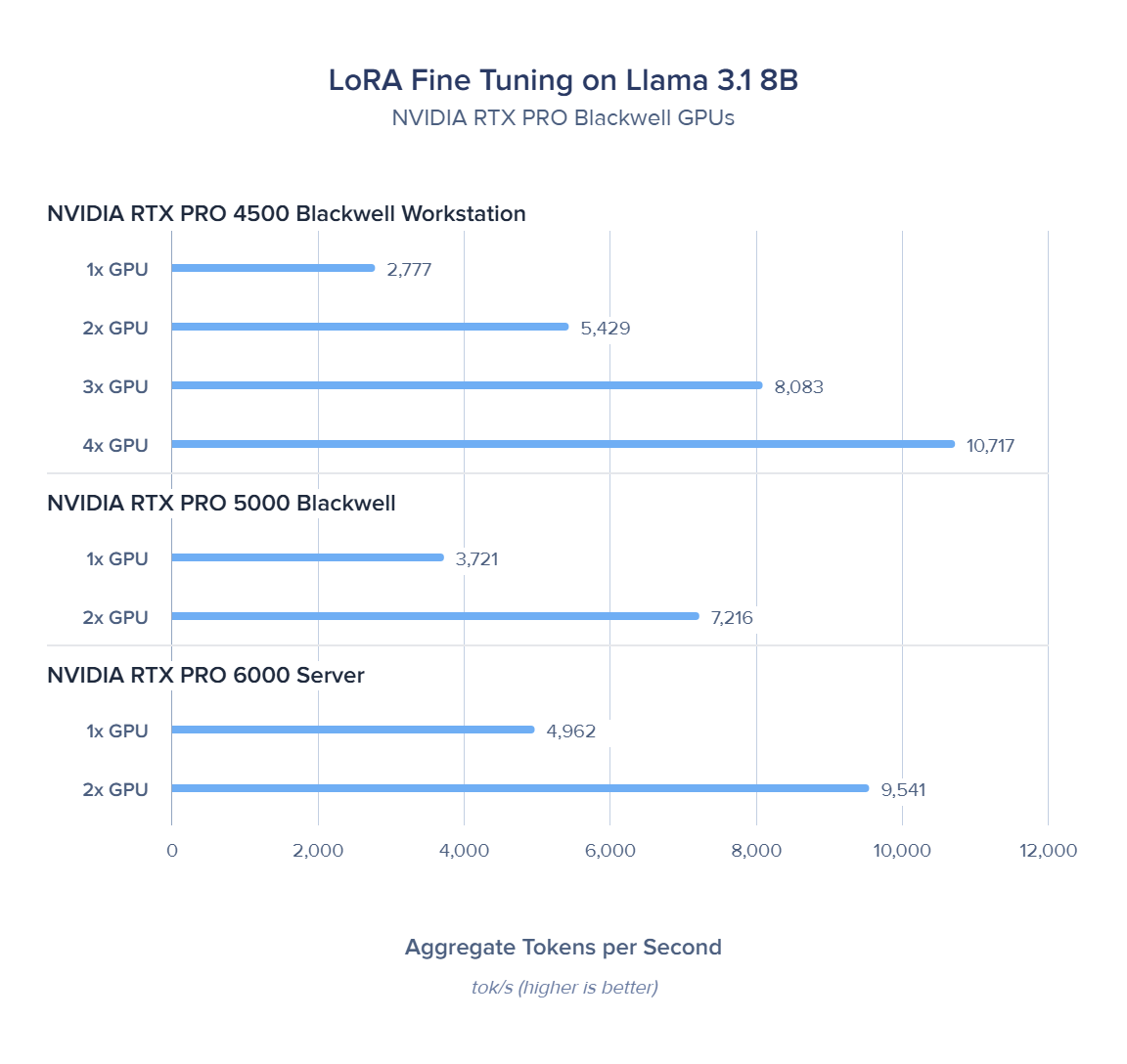
We saw DDP scaling on Blackwell is near-ideal: per-GPU throughput drops only 98 t/s (3.5%) across 1 → 4 GPUs. The gradient all-reduce over PCIe adds minimal overhead because LoRA adapters are small — only q_proj and v_proj gradients are synchronized, not the full 8B parameter gradient tensor. This makes LoRA DDP far more PCIe-efficient than full fine-tuning.
Across these LoRA fine-tuning benchmarks, the RTX PRO Blackwell family shows that on-prem multi-GPU training can scale cleanly without the operational overhead of full model parallelism. RTX PRO 6000 Server Edition leads in single-GPU speed, while 4× RTX PRO 4500 delivers the strongest aggregate throughput and excellent scaling efficiency, making it a compelling configuration for teams optimizing for time-to-results and throughput per dollar. Just as importantly, efficiency improves as you scale out—helping reduce operating cost for iterative experimentation.
| Dataset scale | Parameters to Fine Tune | 1× 4500 | 4× 4500 | 2× 5000 | 2× 6000 SE |
|---|---|---|---|---|---|
| Small (course notes) | 5M | ~30 min | ~8 min | ~12 min | ~9 min |
| Medium (department corpus) | 50M | ~5 hr | ~1.3 hr | ~1.9 hr | ~1.5 hr |
| Large (institutional archive) | 500M | ~50 hr | ~13 hr | ~19 hr | ~15 hr |
| Research-scale | 5B | ~21 days | ~5.4 days | ~8 days | ~6 days |
For practitioners, the takeaway is simple: if your primary workloads are 8B-class models, multi-GPU RTX PRO workstations can deliver near-linear speedups for LoRA and turn multi-hour epochs into sub-hour iterations. If your roadmap includes 70B-class models or larger context lengths that demand substantially more memory headroom, higher-VRAM options like the RTX PRO 6000 Server Edition become the practical choice. Either way, these results reinforce that modern RTX PRO systems are a strong foundation for fast, compliant, and cost-predictable fine-tuning on your own infrastructure.

Run your own open-weight LLM and skip the snowballing API costs. Built for individuals and teams alike. It's not just a piece of hardware, but the tool that propels, accelerates, and enables your research.
Configure NowLoRA fine-tuning is one of the most practical ways to adapt large language models to a specialized domain. It delivers strong results without the memory footprint and hardware complexity of full fine-tuning, which makes it especially attractive for on-prem deployments in education, research, and enterprise environments.
To quantify how well NVIDIA RTX PRO Blackwell GPUs handle this workload, we ran a consistent LoRA fine-tuning benchmark across:
Below are the headline results, followed by the test setup and detailed scaling tables.
10,717 tok/s with 4x RTX PRO 4500 |
96.5% DDP Efficiency with 4x GPU coupled vs separate |
13.9 t/s per watt peak efficiecy on 4x RTX PRO 4500 |
We ran LoRA fine-tuning with Llama 3.1 8B instruct using HuggingFace Transformers with DDP (torchrun). Throughput is reported as per-step tokens-per-second averaged across steps 1-60 (excluding the warm-up step). Power is reported as average GPU draw across the run. VRAM is peak usage during training.
In this setup, LoRA fine-tuning memory footprint is dominated by base model weights plus optimizer states and activations. As a result, all three GPUs land in a similar VRAM range for this 8B workload (about 24-25 GB). Larger models and longer sequence lengths will increase VRAM needs, which is where higher-memory GPUs become more important.
| Parameter | Value | Notes |
|---|---|---|
| Base model | NousResearch/Meta-Llama-3.1-8B-Instruct | Ungated HF mirror with Meta’s weights |
| Fine-tuning method | LoRA (Low-Rank Adaptation) | Adapter-only; base weights frozen |
| LoRA rank | 16 | Standard rank for instruction-tuning tasks |
| LoRA targets | q_proj, v_proj | Attention projection matrices only |
| Batch size | 2 per GPU | Effective batch = 2 × n_gpus with DDP |
| Sequence length | 512 tokens | Representative of instruction/QA datasets |
| Training steps | 60 | Sufficient for stable throughput measurement |
| Multi-GPU strategy | DDP (Distributed Data Parallel) | Each GPU holds a full model replica; gradients synchronized |
| Precision | BF16 (mixed precision) | Base model in BF16 LoRA adapters in FP32 |
| System | AMD EPYC 9124 16C/32T | 4× RTX Pro 4500 (32GB) 2× RTX Pro 5000 (48GB) 2× RTX Pro 6000 SE (96GB) |
GPU Quantity | Aggregate tok/s | Tok/s per GPU | Scaling vs 1 GPU | Efficiency | Average Power (W) | Tok/s per Watt | |||||||||||||||||||||||
|---|---|---|---|---|---|---|---|---|---|---|---|---|---|---|---|---|---|---|---|---|---|---|---|---|---|---|---|---|---|
| NVIDIA RTX PRO 4500 Workstation Edition | |||||||||||||||||||||||||||||
| 1x | 2,777 | 2,777 | 1.00× | — | 289.8 | 9.6 | |||||||||||||||||||||||
| 2x | 5,429 | 2,715 | 1.96× | 97.8% | 455.3 | 11.9 | |||||||||||||||||||||||
| 3x | 8,083 | 2,694 | 2.91× | 97.0% | 623.9 | 13.0 | |||||||||||||||||||||||
| 4x | 10,717 | 2,679 | 3.86× | 96.5% | 771.7 | 13.9 | |||||||||||||||||||||||
| NVIDIA RTX PRO 5000 | |||||||||||||||||||||||||||||
| 1x | 3,721 | 3,721 | 1.00× | — | 358.3 | 10.4 | |||||||||||||||||||||||
| 2x | 7,216 | 3,608 | 1.93× | 97.8% | 568.2 | 12.7 | |||||||||||||||||||||||
| NVIDIA RTX PRO 6000 Server Edition | |||||||||||||||||||||||||||||
| 1x | 4,962 | 4,962 | 1.00× | — | 404.6 | 12.3 | |||||||||||||||||||||||
| 2x | 9,541 | 4,771 | 1.92× | 96.1% | 662.6 | 14.4 | |||||||||||||||||||||||
We saw DDP scaling on Blackwell is near-ideal: per-GPU throughput drops only 98 t/s (3.5%) across 1 → 4 GPUs. The gradient all-reduce over PCIe adds minimal overhead because LoRA adapters are small — only q_proj and v_proj gradients are synchronized, not the full 8B parameter gradient tensor. This makes LoRA DDP far more PCIe-efficient than full fine-tuning.
Across these LoRA fine-tuning benchmarks, the RTX PRO Blackwell family shows that on-prem multi-GPU training can scale cleanly without the operational overhead of full model parallelism. RTX PRO 6000 Server Edition leads in single-GPU speed, while 4× RTX PRO 4500 delivers the strongest aggregate throughput and excellent scaling efficiency, making it a compelling configuration for teams optimizing for time-to-results and throughput per dollar. Just as importantly, efficiency improves as you scale out—helping reduce operating cost for iterative experimentation.
| Dataset scale | Parameters to Fine Tune | 1× 4500 | 4× 4500 | 2× 5000 | 2× 6000 SE |
|---|---|---|---|---|---|
| Small (course notes) | 5M | ~30 min | ~8 min | ~12 min | ~9 min |
| Medium (department corpus) | 50M | ~5 hr | ~1.3 hr | ~1.9 hr | ~1.5 hr |
| Large (institutional archive) | 500M | ~50 hr | ~13 hr | ~19 hr | ~15 hr |
| Research-scale | 5B | ~21 days | ~5.4 days | ~8 days | ~6 days |
For practitioners, the takeaway is simple: if your primary workloads are 8B-class models, multi-GPU RTX PRO workstations can deliver near-linear speedups for LoRA and turn multi-hour epochs into sub-hour iterations. If your roadmap includes 70B-class models or larger context lengths that demand substantially more memory headroom, higher-VRAM options like the RTX PRO 6000 Server Edition become the practical choice. Either way, these results reinforce that modern RTX PRO systems are a strong foundation for fast, compliant, and cost-predictable fine-tuning on your own infrastructure.
Run your own open-weight LLM and skip the snowballing API costs. Built for individuals and teams alike. It's not just a piece of hardware, but the tool that propels, accelerates, and enables your research.
Configure Now