Storage
RAID Storage Array Explained - Redundancy & Performance for HDD
February 12, 2026
16 min read

.jpg?format=webp)
RAID (Redundant Array of Independent Disks) is a data storage technology that provides redundancy and fault tolerance, speed, or both in home labs and data centers. It utilizes multiple physical drives, distributes packets of data between them, and enhances performance, reliability, and/or data protection through data allocation. RAID configurations distribute data across the drives in different ways, offering various levels of redundancy and speed.
We will use an example of a 4TB, four-drive storage server array with hypothetical read and write speeds: 4x 1TB hard drives with 150 MB/s read and 150 MB/s write speeds each. Below is a table that provides an overview of pros, cons, and use cases. RAID is not just for HDDs, though; you can also run RAID with NVMe SSDs.
We will show how RAID 0 vs RAID 1 vs RAID 5 vs RAID 6 vs RAID 10 compare when we have 4x 1TB HDDs with 150 MB/s Read and Write Speeds.
| RAID 0 | RAID 1 | RAID 5 | RAID6 | RAID 10 | |
| Minimum Drives Required | 2 Drives | 2 Drives | 3 Drives | 4 Drives | 4 Drives |
| Usable Capacity | 4TB | 1TB | 3TB | 2TB | 2TB |
| Read Speed | 600 MB/s | 600 MB/s | 450 MB/s | 450 MB/s | 300 MB/s |
| Peak Write Speed | 600 MB/s | 150 MB/s | 450 MB/s | 450 MB/s | 300 MB/s |
| Worst-Case Write Speed | 600 MB/s (no parity overhead) | 150 MB/s (no parity overhead) | 37.5 MB/s (parity overhead) | 25 MB/s (parity overhead) | 150 MB/s (no parity overhead) |
| Fault Tolerance | None | As long as 1 remains | Any 1 Drive | Any 2 Drives | 2 Drives (best case) |
| Advantages | Fastest read and write | Best redundancy | Balanced performance & redundancy | Better redundancy | Good speed, better redundancy, and Easy scalability |
| Considerations | No redundancy. One drive failure | Highly reduced capacity | Below-average random write speed | Complex with below-average write speed | Requires 4 drives minimum |
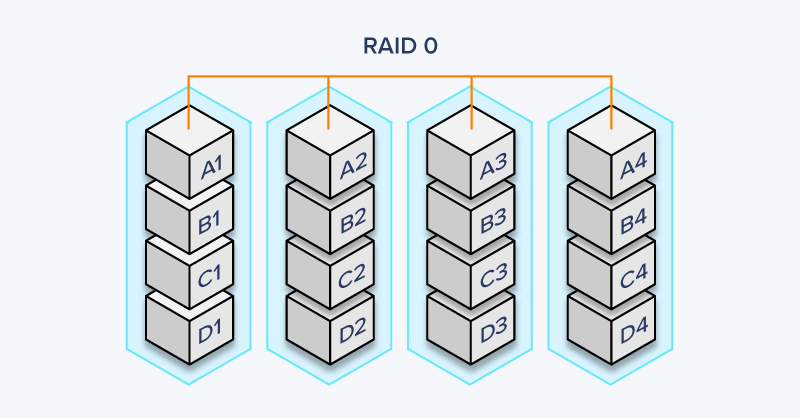
In a RAID 0 configuration, all four drives split a portion of the data without any redundancy. All data is striped across all disk drives, allowing for simultaneous reading and writing across the disks.
RAID 0 is rarely used because it leaves data more vulnerable than storing it on a single drive. Instead of a single weak point, this system has four weak points: if a single drive fails, data is lost. RAID 0 helps define striping, which is the core premise of RAID, and why RAID 0 should never be used for meaningful data.
In a 4-drive storage system, imagine you want to store Project A. Instead of a single drive storing all of Project A’s data, each of the four drives will store a portion of it, such as blocks A1 through A4. When reading Project A, all four drives work simultaneously to deliver their blocks of data to the destination. This is true for all data stored in the system.
RAID 0 is rarely used for important application workloads and is typically used only when the data stored on it is temporary or easily replaceable. Because of its higher read and write performance, it is used predominantly by consumers and rarely by businesses.
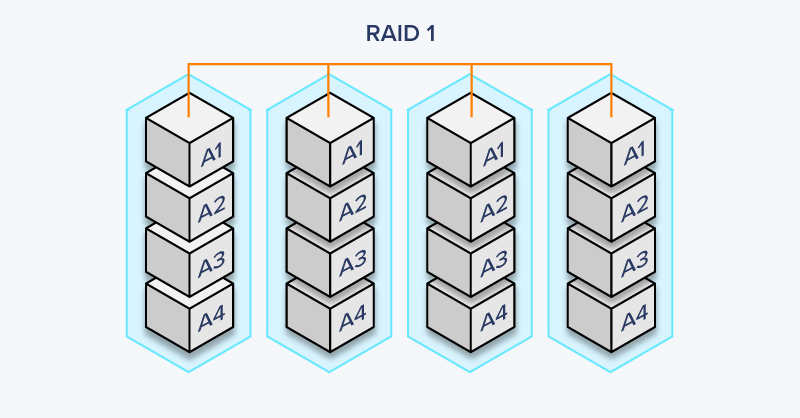
With RAID 1, each drive contains a complete duplicate of all stored information. When data is written, it is copied identically to every drive in the array simultaneously, eliminating rebuild delays and providing excellent data protection.
The primary drawback is efficiency: total available storage equals only the size of your smallest drive, regardless of how many drives you have. This configuration is typically implemented in two-drive systems.
RAID 1 is commonly used in scenarios where data protection and uptime are more critical than storage capacity or write performance. It's particularly popular for operating system drives, database servers, and critical business applications where any data loss could be catastrophic. Additionally, RAID 1 is ideal for systems that require fast read performance with multiple users accessing data simultaneously, as all drives contain complete copies of the data and can serve read requests in parallel.
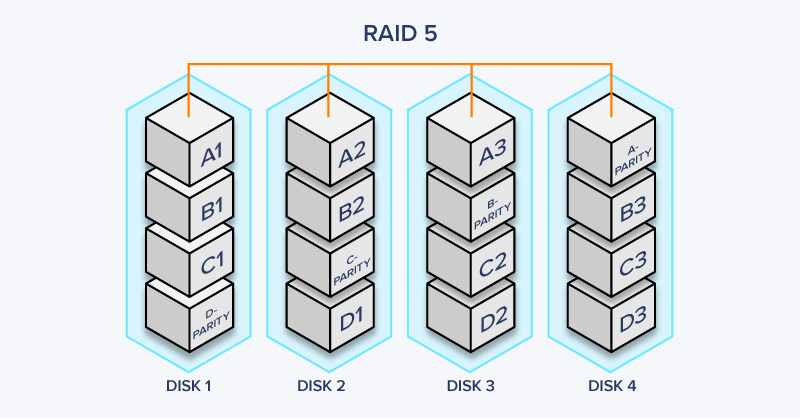
RAID 5 spreads both your actual data and parity (recovery information) across the array. This parity data serves as a mathematical backup: if one drive fails, the system calculates what was lost using information from the remaining drives.
With at least three drives required, RAID 5 strikes a middle ground: you get better storage efficiency than mirroring while maintaining protection that pure striping lacks. Drive replacements should be routine tasks, but in the event of an unexpected drive failure, the other drives will rebuild the array. During rebuild, your array runs with reduced protection, so keep that in mind.
Among all configurations, RAID 5 remains the go-to choice for many users. By spreading information across your entire four-drive array, you gain solid read speeds while keeping write performance reasonably high for most tasks. However, when handling lots of small, scattered writes, performance can drop significantly—sometimes to just 37.5 MB/s up to 200 MB/s—because the system must calculate and update parity data with each operation.

Power your workloads with confidence and configure an Exxact 2U TensorEX Server equipped with multiple GPUs, storage, networking, and more to build your ideal computing infrastructure.
Configure Now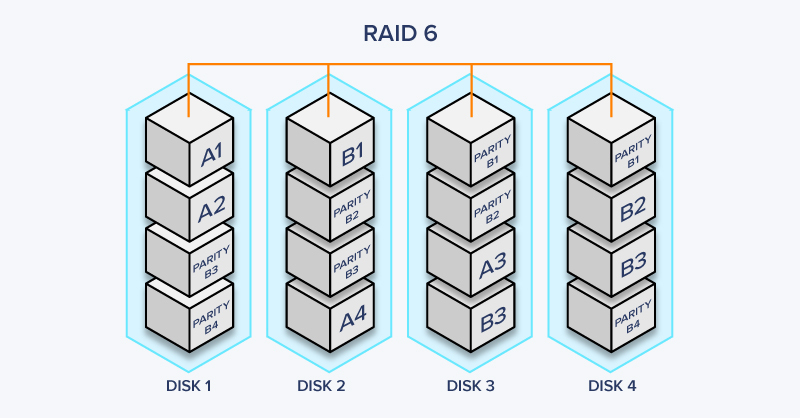
RAID 6 builds upon RAID 5 by adding an additional level of redundancy. It uses dual parity information distributed across the drives, providing fault tolerance even if two drives fail simultaneously. RAID 6 requires a minimum of four drives and offers enhanced data protection and fault tolerance compared to RAID 5. However, it comes with a trade-off of reduced write performance due to the additional parity calculations.
RAID 6 is a more robust and fault-tolerant version of RAID 5. However, due to the additional parity calculations, write performance also suffers in nonsequential operations. In RAID 6’s worst-case small random write scenario, expect write performance of 25 MB/s to 150 MB/s.
.jpg?format=webp)
RAID 10, also known as RAID 1+0 and RAID 01, combines the benefits of both mirroring (RAID 1) and striping (RAID 0). It requires a minimum of four drives, where data is mirrored across pairs of drives, and then the mirrored pairs are striped together. RAID 10 provides high redundancy, excellent performance, and faster data recovery in case of a drive failure.
RAID 10 is commonly used in enterprise environments where both high performance and strong data protection are essential. It's particularly popular for database servers, virtualization hosts, and applications with heavy transactional workloads that require consistent read and write speeds. The mirrored pairs provide redundancy while striping delivers improved throughput, making RAID 10 ideal for mission-critical systems where downtime is costly. However, the 50% storage overhead means you'll need to invest in more drives compared to RAID 5 or RAID 6 to achieve the same usable capacity.
For years, hardware RAID controllers were considered the gold standard for storage configurations. These dedicated cards came with their own processors, cache memory, and battery backup units to handle all RAID operations independently. However, modern CPUs have become so powerful that this dedicated hardware approach has lost much of its advantage.
The reality is that hardware RAID controllers have significant drawbacks:
Software RAID, on the other hand, leverages your system's CPU to manage RAID operations. Modern implementations like Linux mdadm, Windows Storage Spaces, and ZFS offer excellent performance and flexibility. The main downside is that software RAID consumes CPU resources. During intensive RAID operations like rebuilds or parity calculations, you may see noticeable CPU usage that could impact other applications.
For most workloads, this CPU overhead is negligible on modern multi-core processors. However, in high-performance computing environments or systems running CPU-intensive workloads, even small CPU overhead can add up.
This is where Graid Technology introduces an innovative solution: GPU-accelerated RAID. Instead of using your CPU or a dedicated RAID controller, Graid leverages the massive parallel processing power of GPUs to handle RAID operations.
GPUs excel at parallel computations, which is exactly the type of operation required for RAID parity calculations and data striping. By offloading these tasks to a GPU, GRAID delivers:
GRAID represents the next evolution in RAID technology by combining the flexibility of software RAID with dedicated processing power that doesn't burden your CPU. For data centers and high-performance storage systems, GPU RAID is becoming an increasingly compelling option that addresses the limitations of both traditional hardware and software RAID approaches.
.png)
Pair your Exxact storage hardware with enterprise storage platform solutions for parallel file storage, object file storage, and many more. Exxact has partnerships with WEKA, VDURA, DDN, and more.
Talk to an Engineer TodayRAID (Redundant Array of Independent Disks) is a storage technology that combines multiple physical drives into a single logical unit to improve performance, reliability, or both. You need RAID if you want to protect your data against drive failures, improve read/write speeds, or both. It's essential for servers, workstations, and any system where data availability and performance are critical.
RAID 5 is the most common choice for most users because it offers the best balance of performance, storage capacity, and redundancy. However, the "best" configuration depends on your specific needs:
No, RAID is not a backup solution. RAID protects against hardware failure, but it does not protect against data corruption, accidental deletion, malware, or catastrophic events like fire or theft. You should always maintain separate backups of your critical data following the 3-2-1 rule: 3 copies of your data, on 2 different media types, with 1 copy stored off-site.
When a drive fails in a redundant RAID configuration (RAID 1, 5, 6, or 10), the array continues to operate using the remaining drives. You can hot-swap the failed drive with a new one, and the RAID controller will automatically rebuild the data onto the replacement drive. During this rebuild process, the array is vulnerable, so it's important to replace failed drives promptly and monitor drive health proactively.
Yes, many RAID configurations support expansion. RAID 5, RAID 6, and RAID 10 offer good scalability, allowing you to add drives to increase capacity and performance. However, the process varies depending on your RAID controller and configuration. Always back up your data before attempting to expand or reconfigure a RAID array, and consult your hardware documentation for specific procedures.
Hardware RAID uses a dedicated RAID controller card with its own processor to manage the array, offloading work from the CPU and typically offering better performance and more features. Software RAID uses the system's CPU and operating system to manage the array, which is more cost-effective but may impact system performance. Hardware RAID is generally preferred for mission-critical applications and enterprise environments.
Rebuild time depends on drive capacity, RAID level, controller performance, and system load. For modern high-capacity drives (8TB+), rebuilds can take 24-48 hours or longer. During this time, the array is vulnerable to additional failures. This is why RAID 6 (with dual parity) is increasingly popular for large arrays, and why proactive drive monitoring and replacement are essential.
The right RAID level depends entirely on your priorities. If maximum performance matters most and you have backups elsewhere, RAID 0 delivers speed. For critical data that cannot be lost, RAID 1 or RAID 10 provides the strongest protection through mirroring. When you need to balance capacity, performance, and redundancy, RAID 5 offers the best balance for most applications. And when you require protection against multiple simultaneous drive failures, RAID 6 provides that extra layer of security.
Remember that RAID is not a backup solution—it protects against hardware failure, not data corruption, accidental deletion, or catastrophic events. Always maintain separate backups of critical data. We like a 3-2-1 rule: 3 copies, 2 different types, 1 copy stored off-site:
While rebuilds are handy, they are a safety net; they leave your array vulnerable during reconstruction. Always monitor drive health proactively and replace aging drives before they fail.
The investment in additional drives and RAID hardware pays dividends in uptime, data availability, and peace of mind. Whether you're building a home server or managing enterprise storage, understanding these configurations helps you make informed decisions about protecting and accessing your data. Need help determining which RAID level is best for your specific workload? Contact Exxact for personalized guidance and configuration on optimizing your own storage infrastructure.
.png)
With access to the highest performing hardware, at Exxact, we offer the storage and hardware platforms optimized for your deployment, budget, and desired performance.
Talk to an Engineer TodayRAID (Redundant Array of Independent Disks) is a data storage technology that provides redundancy and fault tolerance, speed, or both in home labs and data centers. It utilizes multiple physical drives, distributes packets of data between them, and enhances performance, reliability, and/or data protection through data allocation. RAID configurations distribute data across the drives in different ways, offering various levels of redundancy and speed.
We will use an example of a 4TB, four-drive storage server array with hypothetical read and write speeds: 4x 1TB hard drives with 150 MB/s read and 150 MB/s write speeds each. Below is a table that provides an overview of pros, cons, and use cases. RAID is not just for HDDs, though; you can also run RAID with NVMe SSDs.
We will show how RAID 0 vs RAID 1 vs RAID 5 vs RAID 6 vs RAID 10 compare when we have 4x 1TB HDDs with 150 MB/s Read and Write Speeds.
| RAID 0 | RAID 1 | RAID 5 | RAID6 | RAID 10 | |
| Minimum Drives Required | 2 Drives | 2 Drives | 3 Drives | 4 Drives | 4 Drives |
| Usable Capacity | 4TB | 1TB | 3TB | 2TB | 2TB |
| Read Speed | 600 MB/s | 600 MB/s | 450 MB/s | 450 MB/s | 300 MB/s |
| Peak Write Speed | 600 MB/s | 150 MB/s | 450 MB/s | 450 MB/s | 300 MB/s |
| Worst-Case Write Speed | 600 MB/s (no parity overhead) | 150 MB/s (no parity overhead) | 37.5 MB/s (parity overhead) | 25 MB/s (parity overhead) | 150 MB/s (no parity overhead) |
| Fault Tolerance | None | As long as 1 remains | Any 1 Drive | Any 2 Drives | 2 Drives (best case) |
| Advantages | Fastest read and write | Best redundancy | Balanced performance & redundancy | Better redundancy | Good speed, better redundancy, and Easy scalability |
| Considerations | No redundancy. One drive failure | Highly reduced capacity | Below-average random write speed | Complex with below-average write speed | Requires 4 drives minimum |
In a RAID 0 configuration, all four drives split a portion of the data without any redundancy. All data is striped across all disk drives, allowing for simultaneous reading and writing across the disks.
RAID 0 is rarely used because it leaves data more vulnerable than storing it on a single drive. Instead of a single weak point, this system has four weak points: if a single drive fails, data is lost. RAID 0 helps define striping, which is the core premise of RAID, and why RAID 0 should never be used for meaningful data.
In a 4-drive storage system, imagine you want to store Project A. Instead of a single drive storing all of Project A’s data, each of the four drives will store a portion of it, such as blocks A1 through A4. When reading Project A, all four drives work simultaneously to deliver their blocks of data to the destination. This is true for all data stored in the system.
RAID 0 is rarely used for important application workloads and is typically used only when the data stored on it is temporary or easily replaceable. Because of its higher read and write performance, it is used predominantly by consumers and rarely by businesses.
With RAID 1, each drive contains a complete duplicate of all stored information. When data is written, it is copied identically to every drive in the array simultaneously, eliminating rebuild delays and providing excellent data protection.
The primary drawback is efficiency: total available storage equals only the size of your smallest drive, regardless of how many drives you have. This configuration is typically implemented in two-drive systems.
RAID 1 is commonly used in scenarios where data protection and uptime are more critical than storage capacity or write performance. It's particularly popular for operating system drives, database servers, and critical business applications where any data loss could be catastrophic. Additionally, RAID 1 is ideal for systems that require fast read performance with multiple users accessing data simultaneously, as all drives contain complete copies of the data and can serve read requests in parallel.
RAID 5 spreads both your actual data and parity (recovery information) across the array. This parity data serves as a mathematical backup: if one drive fails, the system calculates what was lost using information from the remaining drives.
With at least three drives required, RAID 5 strikes a middle ground: you get better storage efficiency than mirroring while maintaining protection that pure striping lacks. Drive replacements should be routine tasks, but in the event of an unexpected drive failure, the other drives will rebuild the array. During rebuild, your array runs with reduced protection, so keep that in mind.
Among all configurations, RAID 5 remains the go-to choice for many users. By spreading information across your entire four-drive array, you gain solid read speeds while keeping write performance reasonably high for most tasks. However, when handling lots of small, scattered writes, performance can drop significantly—sometimes to just 37.5 MB/s up to 200 MB/s—because the system must calculate and update parity data with each operation.
Power your workloads with confidence and configure an Exxact 2U TensorEX Server equipped with multiple GPUs, storage, networking, and more to build your ideal computing infrastructure.
Configure NowRAID 6 builds upon RAID 5 by adding an additional level of redundancy. It uses dual parity information distributed across the drives, providing fault tolerance even if two drives fail simultaneously. RAID 6 requires a minimum of four drives and offers enhanced data protection and fault tolerance compared to RAID 5. However, it comes with a trade-off of reduced write performance due to the additional parity calculations.
RAID 6 is a more robust and fault-tolerant version of RAID 5. However, due to the additional parity calculations, write performance also suffers in nonsequential operations. In RAID 6’s worst-case small random write scenario, expect write performance of 25 MB/s to 150 MB/s.
RAID 10, also known as RAID 1+0 and RAID 01, combines the benefits of both mirroring (RAID 1) and striping (RAID 0). It requires a minimum of four drives, where data is mirrored across pairs of drives, and then the mirrored pairs are striped together. RAID 10 provides high redundancy, excellent performance, and faster data recovery in case of a drive failure.
RAID 10 is commonly used in enterprise environments where both high performance and strong data protection are essential. It's particularly popular for database servers, virtualization hosts, and applications with heavy transactional workloads that require consistent read and write speeds. The mirrored pairs provide redundancy while striping delivers improved throughput, making RAID 10 ideal for mission-critical systems where downtime is costly. However, the 50% storage overhead means you'll need to invest in more drives compared to RAID 5 or RAID 6 to achieve the same usable capacity.
For years, hardware RAID controllers were considered the gold standard for storage configurations. These dedicated cards came with their own processors, cache memory, and battery backup units to handle all RAID operations independently. However, modern CPUs have become so powerful that this dedicated hardware approach has lost much of its advantage.
The reality is that hardware RAID controllers have significant drawbacks:
Software RAID, on the other hand, leverages your system's CPU to manage RAID operations. Modern implementations like Linux mdadm, Windows Storage Spaces, and ZFS offer excellent performance and flexibility. The main downside is that software RAID consumes CPU resources. During intensive RAID operations like rebuilds or parity calculations, you may see noticeable CPU usage that could impact other applications.
For most workloads, this CPU overhead is negligible on modern multi-core processors. However, in high-performance computing environments or systems running CPU-intensive workloads, even small CPU overhead can add up.
This is where Graid Technology introduces an innovative solution: GPU-accelerated RAID. Instead of using your CPU or a dedicated RAID controller, Graid leverages the massive parallel processing power of GPUs to handle RAID operations.
GPUs excel at parallel computations, which is exactly the type of operation required for RAID parity calculations and data striping. By offloading these tasks to a GPU, GRAID delivers:
GRAID represents the next evolution in RAID technology by combining the flexibility of software RAID with dedicated processing power that doesn't burden your CPU. For data centers and high-performance storage systems, GPU RAID is becoming an increasingly compelling option that addresses the limitations of both traditional hardware and software RAID approaches.
Pair your Exxact storage hardware with enterprise storage platform solutions for parallel file storage, object file storage, and many more. Exxact has partnerships with WEKA, VDURA, DDN, and more.
Talk to an Engineer TodayRAID (Redundant Array of Independent Disks) is a storage technology that combines multiple physical drives into a single logical unit to improve performance, reliability, or both. You need RAID if you want to protect your data against drive failures, improve read/write speeds, or both. It's essential for servers, workstations, and any system where data availability and performance are critical.
RAID 5 is the most common choice for most users because it offers the best balance of performance, storage capacity, and redundancy. However, the "best" configuration depends on your specific needs:
No, RAID is not a backup solution. RAID protects against hardware failure, but it does not protect against data corruption, accidental deletion, malware, or catastrophic events like fire or theft. You should always maintain separate backups of your critical data following the 3-2-1 rule: 3 copies of your data, on 2 different media types, with 1 copy stored off-site.
When a drive fails in a redundant RAID configuration (RAID 1, 5, 6, or 10), the array continues to operate using the remaining drives. You can hot-swap the failed drive with a new one, and the RAID controller will automatically rebuild the data onto the replacement drive. During this rebuild process, the array is vulnerable, so it's important to replace failed drives promptly and monitor drive health proactively.
Yes, many RAID configurations support expansion. RAID 5, RAID 6, and RAID 10 offer good scalability, allowing you to add drives to increase capacity and performance. However, the process varies depending on your RAID controller and configuration. Always back up your data before attempting to expand or reconfigure a RAID array, and consult your hardware documentation for specific procedures.
Hardware RAID uses a dedicated RAID controller card with its own processor to manage the array, offloading work from the CPU and typically offering better performance and more features. Software RAID uses the system's CPU and operating system to manage the array, which is more cost-effective but may impact system performance. Hardware RAID is generally preferred for mission-critical applications and enterprise environments.
Rebuild time depends on drive capacity, RAID level, controller performance, and system load. For modern high-capacity drives (8TB+), rebuilds can take 24-48 hours or longer. During this time, the array is vulnerable to additional failures. This is why RAID 6 (with dual parity) is increasingly popular for large arrays, and why proactive drive monitoring and replacement are essential.
The right RAID level depends entirely on your priorities. If maximum performance matters most and you have backups elsewhere, RAID 0 delivers speed. For critical data that cannot be lost, RAID 1 or RAID 10 provides the strongest protection through mirroring. When you need to balance capacity, performance, and redundancy, RAID 5 offers the best balance for most applications. And when you require protection against multiple simultaneous drive failures, RAID 6 provides that extra layer of security.
Remember that RAID is not a backup solution—it protects against hardware failure, not data corruption, accidental deletion, or catastrophic events. Always maintain separate backups of critical data. We like a 3-2-1 rule: 3 copies, 2 different types, 1 copy stored off-site:
While rebuilds are handy, they are a safety net; they leave your array vulnerable during reconstruction. Always monitor drive health proactively and replace aging drives before they fail.
The investment in additional drives and RAID hardware pays dividends in uptime, data availability, and peace of mind. Whether you're building a home server or managing enterprise storage, understanding these configurations helps you make informed decisions about protecting and accessing your data. Need help determining which RAID level is best for your specific workload? Contact Exxact for personalized guidance and configuration on optimizing your own storage infrastructure.
With access to the highest performing hardware, at Exxact, we offer the storage and hardware platforms optimized for your deployment, budget, and desired performance.
Talk to an Engineer Today
.jpg?format=webp)