Benchmarks
Ansys Fluent GPU Benchmark with DRD & Exxact
June 18, 2026
6 min read

More hardware doesn’t always equate to better performance. In collaboration with DRD, leading Ansys software vendor and consultant, our team at Exxact provided the hardware to run GPU benchmarks on Ansys Fluent 2026. Exxact is a hardware partner for DRD and DRD customers, offering configurable workstations and servers for Ansys worflows.
We ran a series of benchmarks on Ansys Fluent using a 41.3 million element exhaust model to examine how different GPU configurations, GPU generations, and precision settings affect both solve time and memory usage.
We tested one, two, four, and eight GPU configurations on
Here's what we found, and what it means for your hardware decisions.
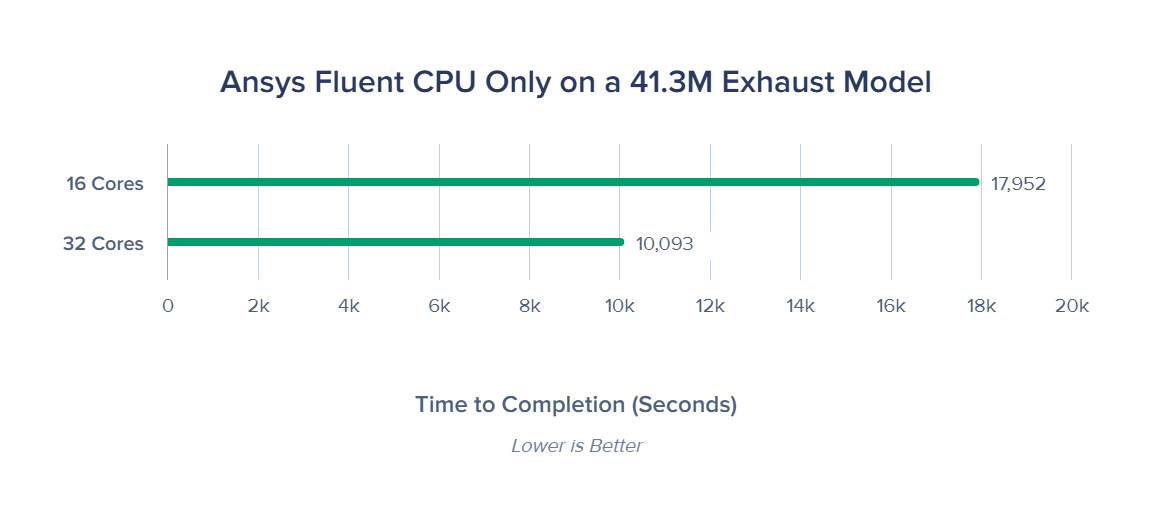
Single AMD EPYC 9135 with 12x 64GB DDR5 ECC vs Dual AMD EPYC 9135 with 24x 64GB DDR5 ECC
.png?format=webp)
Benchmarks ran with 1:1 CPU core to GPU count ratio.
You might’ve heard it before, GPUs are a necessity for Ansys Fluent and CFD workflows. For teams evaluating whether to invest in GPU hardware at all, here’s a very convincing story.
| Configuration | RTX PRO 5000 | RTX PRO 6000 | H200 NVL with NVLink | H200 NVL no NVLink |
|---|---|---|---|---|
| CPU Only 32 Cores | 1x | 1x | 1x | 1x |
| 1x | — | — | — | 15.32x |
| 2x | — | 16.67x | 19.73x | 21.35x |
| 4x | 22.37x | 26.42x | 23.14 | 25.82x* |
| 6x | 26.56x | 29.06x | 30.44x | 24.06x* |
| 8x | 33.67x | 34.23x | 28.65x* | 25.50x* |
*NVIDIA H200 NVL performance plateaus due to communication overhead and the model not saturating all active GPUs
It's also worth noting that optimal CPU-only performance for Fluent typically occurs at around 0.5–2 million cells per core. At 41.3M elements, even 32 cores sit at the upper end of that range, meaning the CPU numbers here reflect a reasonably well-tuned configuration if this is your own option for now. But for CFD, we strongly recommend investing in GPU hardware
The headline numbers across the three GPU configurations tested — NVIDIA RTX PRO 5000, RTX PRO 6000, and H200 NVL — show GPU scaling has a ceiling, depending on the test case.
Once you account for the cost and power draw of two additional GPUs, the key insight here is not that GPU scaling doesn't work, it certainly does. The simulation size has to be large enough to justify the parallelism. At 41.3M elements, this benchmark is likely brushing up against the lower end of where 6x and 8x GPU configurations can truly shine. Larger meshes in the 60–100M+ element range would show more decisive scaling benefits at higher GPU counts.
One underappreciated tool in Fluent's configuration arsenal is precision mode. If your model is pushing the VRAM limits of a 4x GPU configuration, switching from double to hybrid or single precision may let you run the same problem without adding GPUs.
Hybrid Precision is a newer Ansys Fluent feature that uses single precision for field variables and double precision for AMG inner cycles. It retains better numerical accuracy than pure single precision.
The benchmark tested three settings:
| Precision | Memory Usage | Solve Time |
|---|---|---|
| Single | 64.85 GB | 253.14s |
| Hybrid | 87.69 GB | 265.24s |
| Double | 96.54 GB | 299.80s |
Based on these findings, here's how to think about GPU selection for Fluent workloads in this size range:
| Scenario | Configuration Recommendation |
|---|---|
| ~50M elements |
|
| 80–150M+ elements |
|
| VRAM-constrained setups |
|
| CPU vs GPU |
|
At Exxact, we deliver high-performance workstations and servers for engineers running their most demanding simulation workloads. In partnership with DRD — our industry expert for all things Ansys — we help teams find the right hardware for the job.
Our engineers are ready to help you configure a GPU solution that fits your need; talk to our team about running a test drive on your own dataset. Any questions regarding performance on a GPU with your simulation workflow? DRD has amazing engineers that can point you in the right direction!
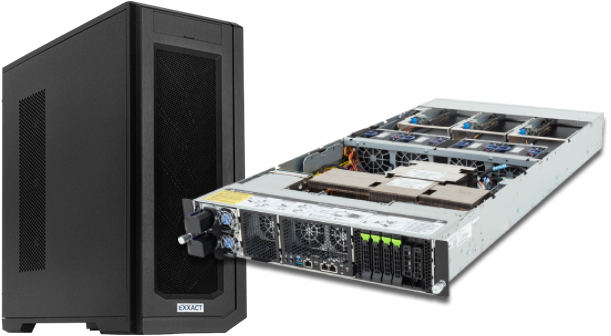
With the latest CPUs and most powerful GPUs available, accelerate your Ansys simulation and CFD project optimized to your deployment, budget, and desired performance!
Configure NowMore hardware doesn’t always equate to better performance. In collaboration with DRD, leading Ansys software vendor and consultant, our team at Exxact provided the hardware to run GPU benchmarks on Ansys Fluent 2026. Exxact is a hardware partner for DRD and DRD customers, offering configurable workstations and servers for Ansys worflows.
We ran a series of benchmarks on Ansys Fluent using a 41.3 million element exhaust model to examine how different GPU configurations, GPU generations, and precision settings affect both solve time and memory usage.
We tested one, two, four, and eight GPU configurations on
Here's what we found, and what it means for your hardware decisions.
Single AMD EPYC 9135 with 12x 64GB DDR5 ECC vs Dual AMD EPYC 9135 with 24x 64GB DDR5 ECC
Benchmarks ran with 1:1 CPU core to GPU count ratio.
You might’ve heard it before, GPUs are a necessity for Ansys Fluent and CFD workflows. For teams evaluating whether to invest in GPU hardware at all, here’s a very convincing story.
| Configuration | RTX PRO 5000 | RTX PRO 6000 | H200 NVL with NVLink | H200 NVL no NVLink |
|---|---|---|---|---|
| CPU Only 32 Cores | 1x | 1x | 1x | 1x |
| 1x | — | — | — | 15.32x |
| 2x | — | 16.67x | 19.73x | 21.35x |
| 4x | 22.37x | 26.42x | 23.14 | 25.82x* |
| 6x | 26.56x | 29.06x | 30.44x | 24.06x* |
| 8x | 33.67x | 34.23x | 28.65x* | 25.50x* |
*NVIDIA H200 NVL performance plateaus due to communication overhead and the model not saturating all active GPUs
It's also worth noting that optimal CPU-only performance for Fluent typically occurs at around 0.5–2 million cells per core. At 41.3M elements, even 32 cores sit at the upper end of that range, meaning the CPU numbers here reflect a reasonably well-tuned configuration if this is your own option for now. But for CFD, we strongly recommend investing in GPU hardware
The headline numbers across the three GPU configurations tested — NVIDIA RTX PRO 5000, RTX PRO 6000, and H200 NVL — show GPU scaling has a ceiling, depending on the test case.
Once you account for the cost and power draw of two additional GPUs, the key insight here is not that GPU scaling doesn't work, it certainly does. The simulation size has to be large enough to justify the parallelism. At 41.3M elements, this benchmark is likely brushing up against the lower end of where 6x and 8x GPU configurations can truly shine. Larger meshes in the 60–100M+ element range would show more decisive scaling benefits at higher GPU counts.
One underappreciated tool in Fluent's configuration arsenal is precision mode. If your model is pushing the VRAM limits of a 4x GPU configuration, switching from double to hybrid or single precision may let you run the same problem without adding GPUs.
Hybrid Precision is a newer Ansys Fluent feature that uses single precision for field variables and double precision for AMG inner cycles. It retains better numerical accuracy than pure single precision.
The benchmark tested three settings:
| Precision | Memory Usage | Solve Time |
|---|---|---|
| Single | 64.85 GB | 253.14s |
| Hybrid | 87.69 GB | 265.24s |
| Double | 96.54 GB | 299.80s |
Based on these findings, here's how to think about GPU selection for Fluent workloads in this size range:
| Scenario | Configuration Recommendation |
|---|---|
| ~50M elements |
|
| 80–150M+ elements |
|
| VRAM-constrained setups |
|
| CPU vs GPU |
|
At Exxact, we deliver high-performance workstations and servers for engineers running their most demanding simulation workloads. In partnership with DRD — our industry expert for all things Ansys — we help teams find the right hardware for the job.
Our engineers are ready to help you configure a GPU solution that fits your need; talk to our team about running a test drive on your own dataset. Any questions regarding performance on a GPU with your simulation workflow? DRD has amazing engineers that can point you in the right direction!
With the latest CPUs and most powerful GPUs available, accelerate your Ansys simulation and CFD project optimized to your deployment, budget, and desired performance!
Configure Now